
Claude Code Keeps Forgetting Your Stack. These 5 Files Fix That.
Paste-ready CLAUDE.md template, settings.json deny list with reasoning, path-scoped UI rules, two custom /project: commands

I’m a Data Scientist. I’ve spent my career in Python and SQL, not CSS/ HTML. Yet, over the last year, I’ve shipped production-grade frontends that are consistent, responsive, and accessible.
In the world of vibe-coding, the biggest risk is Context Drift. Without guardrails, a fast-moving agent will eventually introduce hallucinated complexity. Over the past few months, I’ve gone deep into learning Claude Code to improve my efficiency and efficacy vibe-coding full-stack web apps.
This post contains the exact .claude/ configuration I use to ensure that even though I don’t know the frontend quirks, the repository does. What you get in this post:
A paste-ready
.claude/kit:CLAUDE.md,settings.json, and two custom command file templates.A
settings.jsonwith the exact allow/deny patterns I use, plus the reasoning behind each one.A path-scoped frontend rules template for vibe-coding UI consistently
A Cursor comparison table focused on workflow gaps (context visibility, session management, global commands)
Configuration hierarchy
If you’ve been vibe-coding for a while, you know how chat history can drift and the AI forgets about previous standards you’ve already told it. You start with a clear plan, but a dozen prompts later, the agent loses the plot. Your changes turn into a tangled mess.
I used to hit this wall constantly. As a Data Scientist shipping frontend, I don’t have the domain depth to catch every hallucination in real-time.
I realized the fix isn't better prompting, it’s having a Persistence Layer, or a structured configuration that dictates how the agent thinks, moves, and codes.
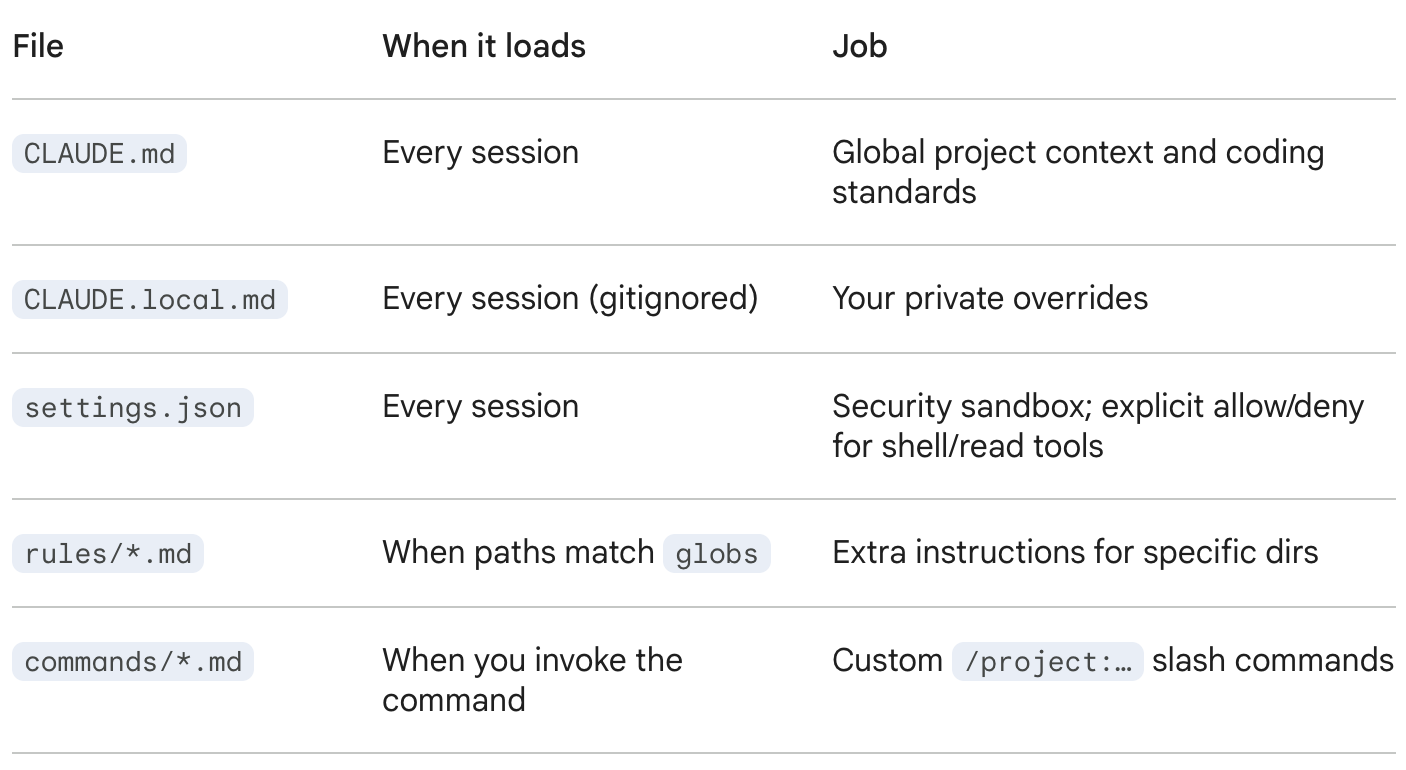
I categorize the .claude/ ecosystem into five functional pieces based on when they load and what they are responsible for:
How user, project, and `.local` stack
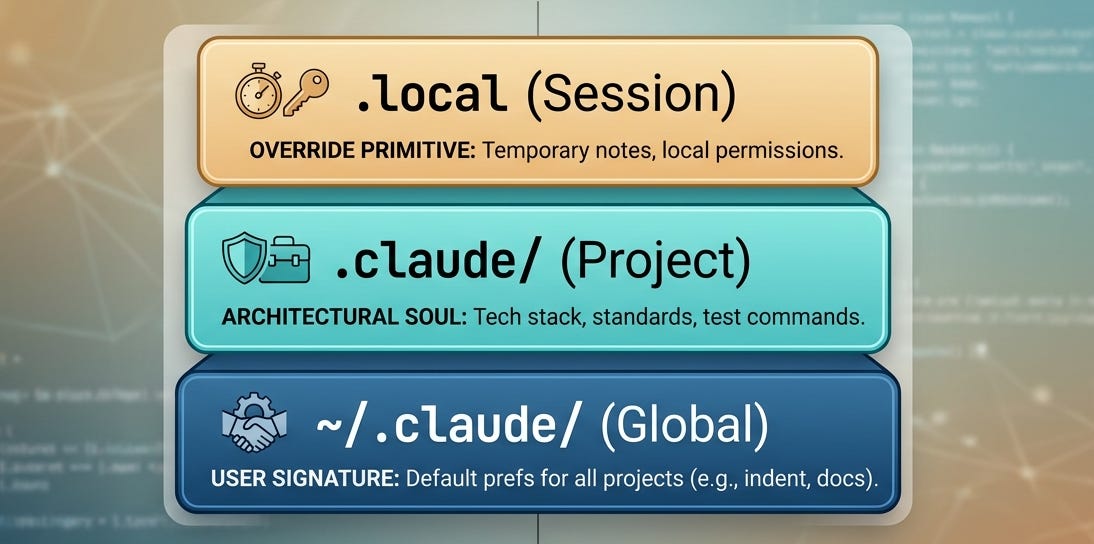
Claude Code operates on a Hierarchical Intelligence model: the narrowest scope always wins. This is how you enforce high-level engineering standards while allowing for surgical, project-specific overrides.
User Scope (
~/.claude/): I use this for universal preferences like indentation or preferred documentation style etc.Project Scope (
.claude/): This defines the repo’s specific tech stack, testing suite, and architectural boundaries.Local Scope (
.local): These files (CLAUDE.local.md,settings.local.json) are automatically created and gitignored. I use these for temporary or session-specific notes.
From Between "Chatting" and "Engineering": Below I’m sharing my private .claude/ Starter Kit. This is the exact setup that allows me to ship production-grade frontend changes as a Data Scientist while minimizing vibe drift and technical debt.
CLAUDE.md Template
Claude Code reads your main project memory file whenever you start real work.
I keep this file under 200 lines to maximize context efficiency. I include the following context in mine:
