
How Coding Agents Actually Work Under the Hood (and Why They Go Wrong)
When the agent says it made a fix but your app still breaks: a clear read on Cursor, Claude Code, and what the session is really doing.

“It should be a quick UI change,” I told myself.
A few weeks ago, I made a small frontend tweak in Cursor and opened a PR. All tests passed and the screen I cared about looked fine. But when I clicked around the web app, something else broke.

I asked the model to fix the regression; it came back with “changes made.” I checked, but it was still broken. I asked again, and that loop repeated several times.
At some point I wasn’t debugging the bug anymore; I was debugging the session (the chat, the tools, what actually ran vs what got summarized). I closed the PR, rolled back, and started over in frustration.
Does this sound familiar? Almost every engineer I’ve talked to who uses AI coding agents has a version of this story.
I wanted a systems-level read, not just more prompting tips. So, I read a technical paper on OpenDev, an open-source terminal coding agent: Building Effective AI Coding Agents for the Terminal: Scaffolding, Harness, Context Engineering, and Lessons Learned (arXiv:2603.05344).
This post explains how coding agents work on a systems level:
What is inside a typical coding agent
Ten common failure patterns
Why a small set of mechanisms explains most of them.
What’s Inside an AI Coding Agent
Most coding agent products stack four layers. The list below is ordinal, going from:
UI → orchestration → tools and growing context → persistence.
Before your first message, the product materializes the session. It:
Binds a model (or models)
Registers which tools exist
Injects rules or skills text
Sets default safety.
After that, runtime code enforces context limits, executes tool calls, appends observations to the thread, and drives approvals.
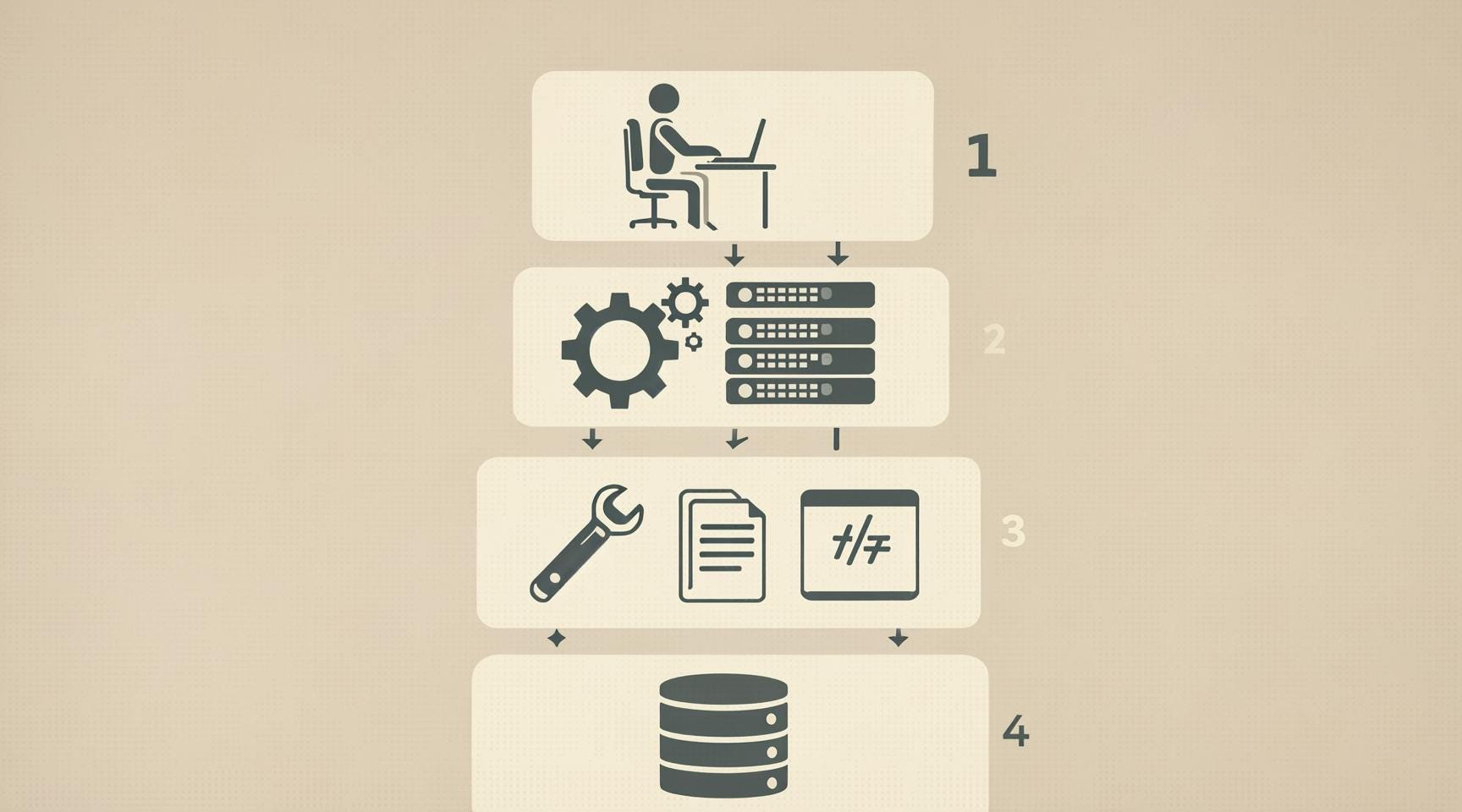
1. Entry / UI layer
The UI layer is where you type prompts and follow-ups, review diffs, and allow or block tool runs. It is the human-facing half of the control loop: every approval or rerun is another turn the runtime records.
2. Agent layer (orchestration)
“Agent” in marketing often means the whole product, whereas in the stack it usually means orchestration. This is the code that:
Picks mode (ask, agent, plan-only)
Applies policy
Issues model calls with the right tool list attached.
Many hosts also route different subtasks to different models, for example cheaper models for summarization vs stronger models editing, without you switching chats.
3. Tools + context
The model never opens files by itself. The host exposes capabilities as tools, such as:
Read files
Search the tree
Run shell commands
Apply_patch (propose a text diff the runtime applies to a file
MCP plugins for third-party APIs
LSP helpers (i.e. jump to definition, find references, rename)
The model returns structured tool calls, then the runtime runs them and appends the return text to the thread. The next model call receives that full message history as part of its input.
4. Persistence
These include saved conversations, permission / approval mode, undo for recent edits, and sometimes snapshots or git-based rollback so shell changes are reversible.
How One Agent Turn Usually Works
Across Cursor, Claude Code, and similar agents, the high-level pattern is ReAct-like, where:
The model proposes tool-backed actions
The runtime executes them and returns observations
Each round trip appends assistant text and tool output to the same thread, so context length grows with every step unless something trims it.
Below are common roles in that loop (names can vary by product):
Context handling: if the next request would exceed the model’s limit, the runtime can summarize, mask older tool output, truncate, or offload large blobs to disk and keep a short pointer in the thread.
Planning without tools (sometimes a visible “plan” step): an LLM call where tool definitions are omitted or reduced, so the model returns plain text or a plan instead of immediate tool calls.
Action with tools: an LLM call where full tool schemas are attached, and the runtime executes returned tool calls and appends results.
Runtime safety checks (around tool execution): deduplication or throttling of repeated identical invocations, approval prompts before destructive commands, and allowlists / blocklists on command patterns
Ten Common Failure Patterns
Below are ten common failure patterns that show up across coding agents in IDEs and terminals. I’ve hit at least a few, and you probably have too.
1. False progress
The transcript reads finished, but automated checks or manual inspection still show the bug.
2. Doom loops
You type new prompts, but the agent keeps issuing the same tool call because the last observations did not change.
3. Instruction drift
Typically instruction fade shows up after 30+ tool-heavy turns in long sessions. Your rules and skills text are still in the payload, but tokens at the end of the context (like fresh errors, big logs) pull attention away from earlier context, so behavior drifts even though nothing was deleted.
4. Context drowning
One noisy step can return tens of thousands of tokens, for example:
A full test or CI run with verbose failures
docker compose/server logsgrepor search over a huge hit listread_fileon a large generated file.
Without compaction or masking, that blob is sent again on every later request, so it takes up space from the actual task on each call.
5. Plan mode that isn’t structural
“Plan only” fails if the same request still lists write-capable tools in the tool schema, because the model can still emit writes as valid tool calls. A structural read-only plan removes write tools from the schema for that step so destructive calls are not valid outputs.
6. Subagent collisions
The transcript has an order, but two editors (you and the agent, or two agents) on the same paths still race on disk, and interleaved tool output makes it easy to lose who changed which file last.
7. Edit mismatch
Search-and-replace style steps need old_string to match the file exactly. The model often returns text that is almost right but differs by whitespace or line endings, so apply fails or matches the wrong span.
8. Stale reads
The model’s last read is stale because you or another tool changed the file afterward. The next patch can still “work” against cached text in the thread unless the runtime re-reads or checks freshness. This is more common when you edit while the agent runs or when multiple agents share a tree.
9. Recovery spirals
Errors or templates point at a tool or MCP server that is not enabled in this workspace, so you get repeated invalid tool calls and the model keeps retrying.
10. Startup schema tax
Loading full JSON schemas for every MCP tool into the first request burns context before your task text.
Why These Failures Keep Happening
A few mechanisms explain most of what people feel in long sessions:
Flat Context Window
The model reads one ordered sequence: system text, tool definitions, your messages, assistant messages, and prior tool output. There is no separate channel that pins your rules. When the tail fills with errors and logs, behavior shifts toward reacting to that tail.
The Billed Prompt is Bigger than Your Rules File
Where the API exposes prompt_tokens, it usually includes:
System/developer text
Serialized tools
Attachments
Full history
New tool results
The window grows because almost every turn appends another assistant message plus tool output. Unless the product summarizes, masks, or truncates, nothing leaves the context except what you manually delete or reset.
Chat and Tool Execution are Different Channels
The model can sound cooperative in English while still proposing the same tool call again on the next turn, because that call is still a valid next step. Natural-language agreement is not the same object as scheduler state or disk state.
Tool Output often Dominates
The OpenDev authors report that in their terminal coding agent, tool outputs (file reads, command output, search hits) typically consume about 70–80% of the context window in a typical session, swamping the system prompt and the model’s own reasoning.
Part 2: Mitigations for these Failures
This post mapped four layers, a typical tool loop, ten failure patterns, and why they occur.
Next week’s paid post is the other half, where I’ll write about concrete steps to guard against these failure patterns and improve day-to-day agentic coding.
Going deeper on Claude Code:
16 Claude Code Commands That Actually Changed My Workflow is free in full and includes the slash commands I use.
Claude Code keeps forgetting your stack. These 5 Files Fix That. lays out why chat-only guardrails fail, and paid subscribers get the paste-ready
.claude/kit (CLAUDE.md,settings.json, custom/project:templates) so your standards reload with the repo.